


 Roll over image to zoom in
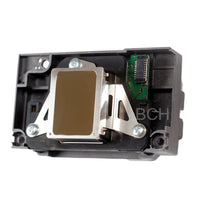
FA040xx Printhead Deep Cleaning & Reseal Kit
For Epson EcoTank, L-Series, XP & WF Printers (Mesh Intake Only) This FA040xx Deep Cleaning Kit is a complete solution for advanced internal printhead maintenance. It allows you to safely...
$39.99
For Epson EcoTank, L-Series, XP & WF Printers (Mesh Intake Only)
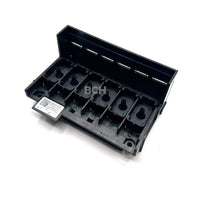
This FA040xx Deep Cleaning Kit is a complete solution for advanced internal printhead maintenance. It allows you to safely open compatible FA040xx printheads, clean the internal ink chambers, and reseal the printhead correctly after service.
This kit is designed for experienced users performing true internal cleaning, not basic external flushing.
Watch This Before Order It
✅ What This Kit Is For
This kit is designed specifically for FA040xx-series Epson printheads with an internal oval mesh ink intake.
Compatible printhead assembly labels include:
-
FA04000
-
FA04010
-
FA04040
-
Other FA040xx variants
⚠️ Important:
Not all FA040xx printheads are the same.
Some FA040xx heads do NOT have mesh intakes and are NOT compatible.
You must verify that your printhead’s internal ink intake:
-
Is oval-shaped
-
Has a visible mesh screen
-
Matches the product photos
If it does not, this kit will not work.
🧰 What’s Included in the Kit
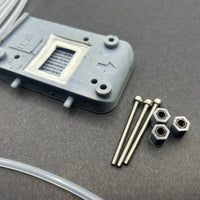
This kit includes everything needed to perform a proper internal deep clean and reseal:
-
✔ FA040xx Internal Gasket
Precision-fit seal for mesh-intake FA040xx printheads -
✔ Two Printhead Clamps
Used to hold the printhead halves evenly during resealing and curing -
✔ Wash Bottle
For controlled flushing of internal ink chambers -
✔ Syringe with Tube
For targeted fluid delivery and controlled suction -
✔ Resealing Adhesive
Designed to reseal the printhead housing after cleaning
Each component is included for a specific reason — skipping steps or tools can result in leaks, air intrusion, or permanent damage.
🖨️ Compatible Epson Printer Models
🇺🇸 US MODELS
Expression Home (XP Series)
-
XP-410 / XP-420 / XP-430 / XP-440 / XP-446
-
XP-4100 / XP-4105
-
XP-4200 / XP-4205
WorkForce (WF Series)
-
WF-2010
-
WF-2510 / WF-2520
-
WF-2530 / WF-2540
-
WF-2630 / WF-2650
EcoTank (ET Series)
-
ET-2500 / ET-2550
-
ET-2600 / ET-2650
-
ET-2700 / ET-2720
-
ET-2750 / ET-2760
🌍 INTERNATIONAL (NON-US) MODELS
Epson L-Series
-
L110 / L120
-
L210 / L220
-
L300 / L301 / L303
-
L310 / L3110 / L3150
-
L350 / L351 / L355
-
L360 / L365
-
L380 / L381 / L385 / L395
-
L405 / L4150 / L4160
These models use FA040xx printheads when equipped with mesh ink intake.
🛠️ What This Kit Allows You To Do
When used correctly, this kit allows you to:
-
✔ Open compatible FA040xx printheads safely
-
✔ Access and deep clean internal ink chambers
-
✔ Remove dried ink, pigment buildup, and contamination
-
✔ Restore proper ink flow and pressure balance
-
✔ Reseal the printhead correctly after cleaning
-
✔ Prevent air leaks and post-repair ink loss
This is not possible with standard cleaning routines or external flushing alone.
❌ What This Kit Is NOT For
-
❌ Not a universal Epson printhead kit
-
❌ Not for FA040xx heads without mesh intake
-
❌ Not for printheads with 6 or more ink ports
-
❌ Not compatible with ET-8550, ET-15000, SureColor, or wide-format printers
-
❌ Does not repair electrical failures or burned nozzles
⚠️ Important Skill Disclaimer
This kit is intended for:
-
Advanced DIY users
-
Repair technicians
-
Experienced printer hobbyists
Opening a printhead incorrectly can permanently damage it.
Follow proper procedures and verify compatibility before use.
📌 Before You Order — Final Checklist
✔ FA040xx printhead
✔ Oval mesh ink intake
✔ Matches product photos
✔ You understand internal printhead servicing
If any of the above are not true, do not order.
🧠 Why This Kit Exists
Standard cleanings only address external ink paths. When ink dries or contaminates the internal chambers, no amount of flushing will fix it.
This kit gives you direct internal access — the only way to properly service these printheads and extend their usable life.
Related products




Add your product to the cart to view shipping rates. We've delivered to 289,762 customers in 149 countries.

 Weekly Promotion
Sign up for our newsletter to get weekly coupons and tips on printer refills and repairs.


Got a question? Don't hesitate to email us at support@bchtechnologies.com


Subscribe to Kevin's YouTube channel for the latest tips on printer repair and maintenance.
Recently viewed

34%

I purchased this product and messed it up first time. I somehow got superglue onto the main circuit board on the colour cartridge and for some reason (not sure how) I messed up the black one too. I repurchased the product (x2). I tried again with the colour one first (which is meant to be the most difficult). I was careful to wrap the circuit board and print head in cling film and taped it down on top. I was careful with the superglue and let it dry upside down for 24 hours so that if the glue leaked anywhere it wouldn't go towards the circuit board. It works great. I now have a functioning refillable colour cartridge. I am glad I got the hardest one out of the way first. I will shortly try the black one. But fantastic that overall, I know this product will save me a fortune in printing now. The colour one is obviously the hardest and it works! Good job guys. (I am from the UK which is why we spell colour with a u lol).
Daniel Cunningham
Modification Kit for Making Spongeless Cartridge with Canon PG-210 CL-211 PG-240 CL-241 PG-245 CL-246 PG-243 CL-244 PG-260 CL-261 PG-275 CL-276
Yes, you can easily make your own with a washed out water bottle but these come ready to go and are a better quality plastic. I won’t be using mine as a waste tank since I have a my CISS but will be using the bottle for my maintenance and cleaning solutions.
David Sustaita
XLARGE Waste Ink Collection Tank Combo with Small Tube for Epson (AS-EP-WASTE-25MM)
I can’t say enough about this company! Sent my main board in for repair and they were fast and the cost was reasonable. They are also quick to respond. This is not the first item I’ve purchased from them and won’t be the last. Also, the YouTube videos are a must to watch!
Nancy Donaldson
Fast Track Mainboard Repair: L1800, XP-15000, ET-15000, WF-7610 7620, WF-7110, WF-7710 7720, ET-8550, ET-2720, ET-2750Printer Mainboard, Formatter Board, Motherboard Troubleshooting and Repair