


 Roll over image to zoom in
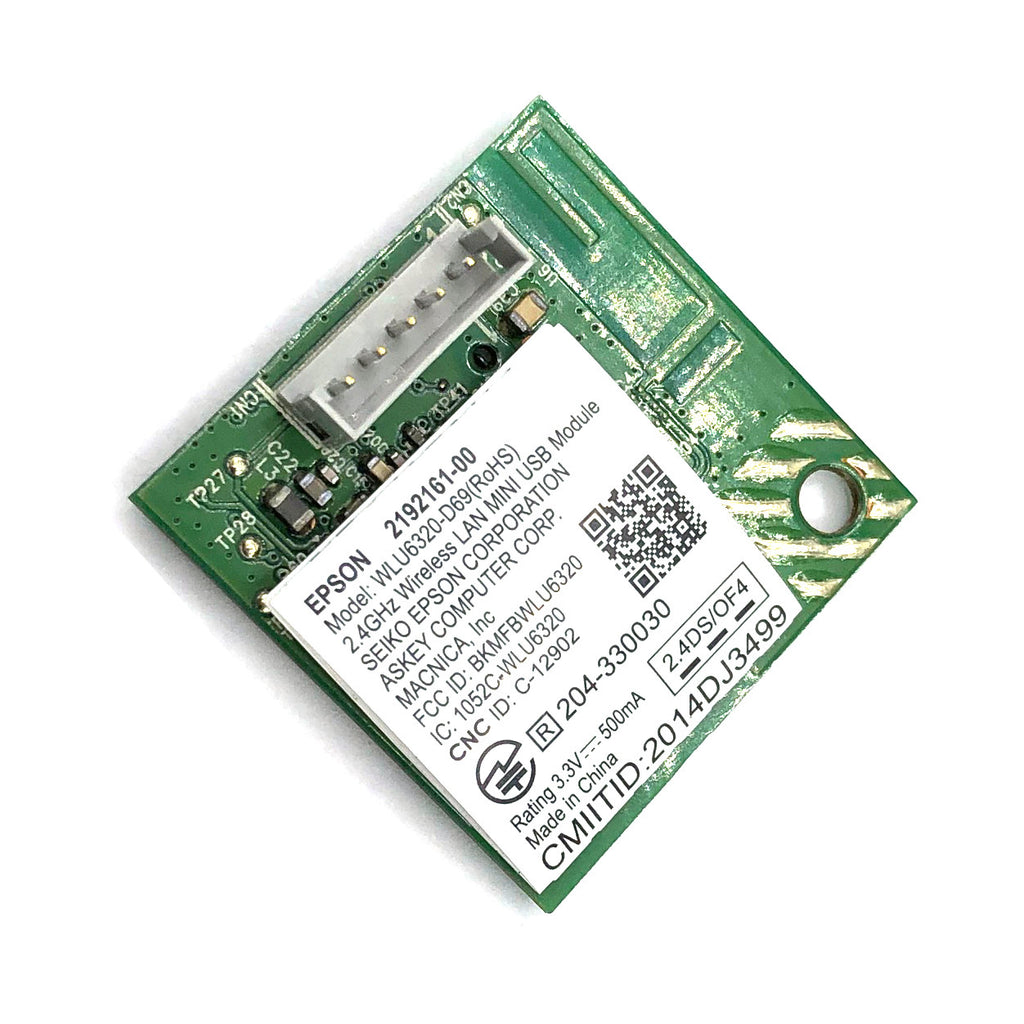
5-Pin Vertical Connect Epson WiFi WLU6320-D69 Wireless LAN Module WIFI Card with a Vertical Connector
Only parts in the pictures are included. What you see is what you get. This one has a connector vertical to the board (see picture). Do not confuse it with...
$29.99
SKU:
PPO-EP-WiFi-WLU6320-Vertical
Categories:
Tags:
- Only parts in the pictures are included. What you see is what you get.
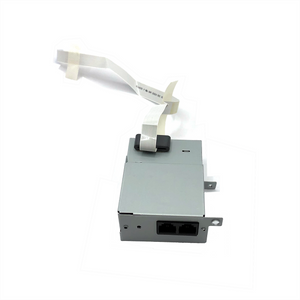
- This one has a connector vertical to the board (see picture). Do not confuse it with horizontal connector models.
- The vertical connector is for you to plug the board directly on the mainboard.
Widely used in Epson WorkForce, EcoTank and XP series such as:
- ET-2650
- L4150
- Pro WF-6090
- WF-2760, WF-2630, WF-2650
- WF-463x Series: WF-4630, WF-4633...
- XP-440
Hardware Revision & Version number may vary. Suggestions: use a phone to zoom in and read the model number, then decide how many pins (count it on the connector) and if the connector is horizontal or vertical.
If you cannot find a horizontal connector version, you will need to plug this board into a connection wire. The board has 5 pins. Some models only need 4-pins and the left most pin (see picture 1) is not used. Therefore, you will see a 4-pin wire inserted into a 5-pin connector.
Related products




Add your product to the cart to view shipping rates. We've delivered to 289,762 customers in 149 countries.

 Weekly Promotion
Sign up for our newsletter to get weekly coupons and tips on printer refills and repairs.


Got a question? Don't hesitate to email us at support@bchtechnologies.com


Subscribe to Kevin's YouTube channel for the latest tips on printer repair and maintenance.
Recently viewed



VERY VERY SUPER PRODUCT. I purchased this product from Kevin and I can always say that Kevin is the best. Kevin definitely creates the best videos on the web. He has the best products and I always buy from him. Kevin also always recommends the best methods. I always recommend buying BCH TECHNOLOGIES products to always have perfect printers.
Alessandro R.
Instruction Sheet for L1800 / 1390 Printhead Testing with Multimeter (Digital Download) Instant Download — Delivered to Your Email
Best thing ever!! i used to put cleaning solution in the capping station with a syringe/hose then had to suck out f the wast line with a syringe.... over and over until the capping station was clean. maybe up to 10 times. now i just use maybe 1 or 2 - 30ml syringes full of water and the pump cleans it out so good.... then I put capping solution, place printhead over capping station and turn on the back of the machine. thats it. when i print again, usually next day, I pull from waste tank a few times until I get ink, then i run 1 head cleaning , print a test strip and usually good to go. I sometimes print a 2nd test strip. SO MUCH easier to use this little pump. so glad I bought it.
Ruth F.
TMS Printhead Maintenance System by BCH: Comprehensive Cleaning and Maintenance Solution
This is a must have modification to save time troubleshooting. You will need to download Kevin's capping station video to disassemble the capping station. A definite must. You will also need a few other connections to hook this up. All parts are linked in his videos. Pro tip. Have patience and go slow. This modification will save you from a lot of headaches . I did this mod on Procolored L1800 about a year old . Thanks Kevin.
Vincent K.
Waste Ink Collection Tank Combo with Small Tube for Epson (AS-EP-WASTE-25MM)