



 Roll over image to zoom in
Printhead Carriage Homing Sensor for L1800, R1390 - Customizable ON/OFF Signals
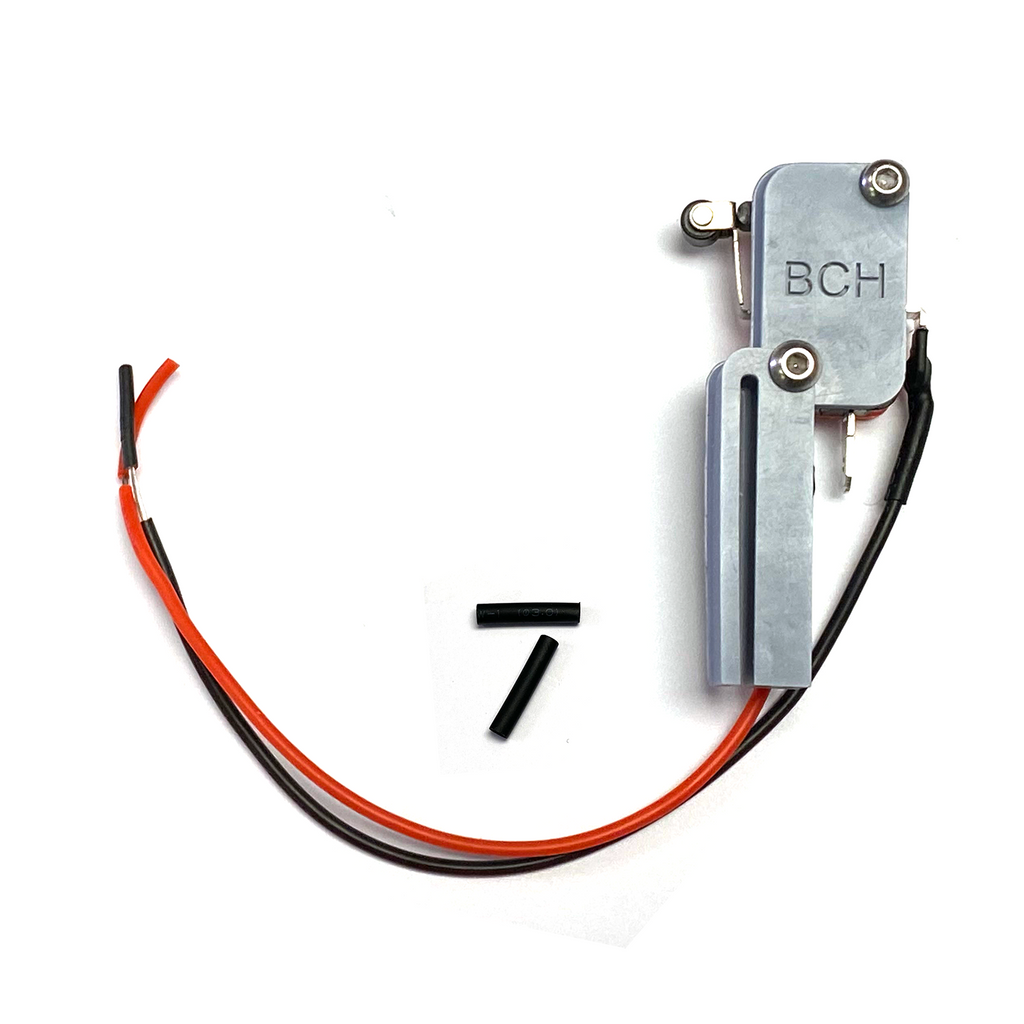
Enhance your printer automation with the L1800, R1390 Printhead Carriage Homing Sensor. This device functions as a switch to detect whether the printhead carriage is parked in the home position...
$19.99 $29.99
Enhance your printer automation with the L1800, R1390 Printhead Carriage Homing Sensor. This device functions as a switch to detect whether the printhead carriage is parked in the home position (on the capping station), providing seamless control over auxiliary printer functions like vacuum platforms. The sensor functions as a mechanical switch, cutting power to connected devices when the printhead is parked and activating them when printing begins. T
Wiring and Connectors
- Black Wire: Connected to the common terminal of the switch. This wire is fixed and must not be removed or modified.
-
Red Wire: By default, connected to the normally OFF connector.
- When the printhead is parked, the red wire is OFF
- When the printhead leaves the parked position to begin printing, the red wire turns ON.
- Open Connector: A reserved connector provides additional customization options. Customers can use it to add another wire for driving multiple devices or setting up custom configurations.
Customizable Options
If you require the sensor to signal ON when parked, the reserved connector allows you to move the red wire for a quick and easy modification.
For controlling multiple devices with differing requirements (e.g., some ON and others OFF when parked), you can utilize the open connector to add additional wiring for versatile functionality.
Package Includes
1x Homing Sensor (default configuration: OFF when parked)
2x Shrink Tubes for easy wire installation
This sensor is an excellent addition to printers equipped with vacuum platforms and other auxiliary systems. Its intuitive, flexible, and customizable design makes it an ideal choice for enhancing your printing setup.
Related products




Add your product to the cart to view shipping rates. We've delivered to 289,762 customers in 149 countries.

 Weekly Promotion
Sign up for our newsletter to get weekly coupons and tips on printer refills and repairs.


Got a question? Don't hesitate to email us at support@bchtechnologies.com


Subscribe to Kevin's YouTube channel for the latest tips on printer repair and maintenance.
Recently viewed



VERY VERY SUPER PRODUCT. I purchased this product from Kevin and I can always say that Kevin is the best. Kevin definitely creates the best videos on the web. He has the best products and I always buy from him. Kevin also always recommends the best methods. I always recommend buying BCH TECHNOLOGIES products to always have perfect printers.
Alessandro Rivolta
Instruction Sheet for L1800 / 1390 Printhead Testing with Multimeter (Digital Download) Instant Download — Delivered to Your Email
Best thing ever!! i used to put cleaning solution in the capping station with a syringe/hose then had to suck out f the wast line with a syringe.... over and over until the capping station was clean. maybe up to 10 times. now i just use maybe 1 or 2 - 30ml syringes full of water and the pump cleans it out so good.... then I put capping solution, place printhead over capping station and turn on the back of the machine. thats it. when i print again, usually next day, I pull from waste tank a few times until I get ink, then i run 1 head cleaning , print a test strip and usually good to go. I sometimes print a 2nd test strip. SO MUCH easier to use this little pump. so glad I bought it.
RUTH FIGUEROA
TMS Printhead Maintenance System by BCH: Comprehensive Cleaning and Maintenance Solution
This is a must have modification to save time troubleshooting. You will need to download Kevin's capping station video to disassemble the capping station. A definite must. You will also need a few other connections to hook this up. All parts are linked in his videos. Pro tip. Have patience and go slow. This modification will save you from a lot of headaches . I did this mod on Procolored L1800 about a year old . Thanks Kevin.
Vincent Kretlow
Waste Ink Collection Tank Combo with Small Tube for Epson (AS-EP-WASTE-25MM)